
Hi, All I write this blog to make a straight forward checklist for small business to perform audit on their environment, so that they have better idea of there cybersecurity posture. A cybersecurity audit is a critical step in identifying vulnerabilities, assessing risks, and ensuring your business is protected against potential threats.
In this blog post, we’ll walk you through how to perform a cybersecurity audit for your small business and provide a practical checklist to help you assess your cybersecurity posture.
What is a Cybersecurity Audit?
A cybersecurity audit is a systematic evaluation of your business’s IT infrastructure, policies, and procedures to identify vulnerabilities, assess risks, and ensure compliance with security best practices. The ultimate goal is to uncover weaknesses that could be exploited by criminals and take steps to mitigate them by enforcing proper controls in place.
Why is a Cybersecurity Audit Important for Small Businesses/SMEs?
In Australia, companies have to do Essential 8 compliant, in which they have to implement 8 points, which are : Patch apps: Update all software, Enable MFA: Use multi-factor authentication, Limit admins: Restrict admin access., Control apps: Allow only approved apps., Block macros: Restrict Office macros, Harden apps: Secure app configurations., Backup data: Regularly back up and test.

Step-by-Step Guide to Performing a Cybersecurity Audit (1-8)
Step 1: Define the Scope of the Audit
- Identify the systems, networks, and data to be audited (e.g., email, cloud storage, customer databases).
- Determine whether the audit will cover internal systems, third-party vendors, or both.
Step 2: Assemble Your Team
- Assign roles and responsibilities for the audit.
- If you lack in-house expertise, consider hiring a cybersecurity consultant or firm.
Step 3: Review Your Cybersecurity Policies
- Evaluate existing policies, such as password management, data encryption, and incident response.
- Ensure policies are up-to-date and aligned with industry standards.
Step 4: Assess Your IT Infrastructure
- Inventory all hardware (e.g., computers, servers, routers) and software (e.g., operating systems, applications).
- Identify outdated or unsupported systems that may pose security risks.
Step 5: Evaluate Access Controls
- Review user accounts and permissions to ensure employees have access only to the data they need.
- Check for inactive or outdated accounts that should be deactivated.
Step 6: Test Your Defenses
- Conduct vulnerability scans and penetration testing to identify weaknesses in your network.
- Simulate phishing attacks to assess employee awareness and response.
Step 7: Analyze Incident Response Plans
- Review your incident response plan to ensure it’s comprehensive and up-to-date.
- Test the plan through tabletop exercises or simulations.

Step 8: Document Findings and Create an Action Plan
- Compile a report detailing vulnerabilities, risks, and recommendations.
- Prioritize actions based on the severity of risks and available resources.

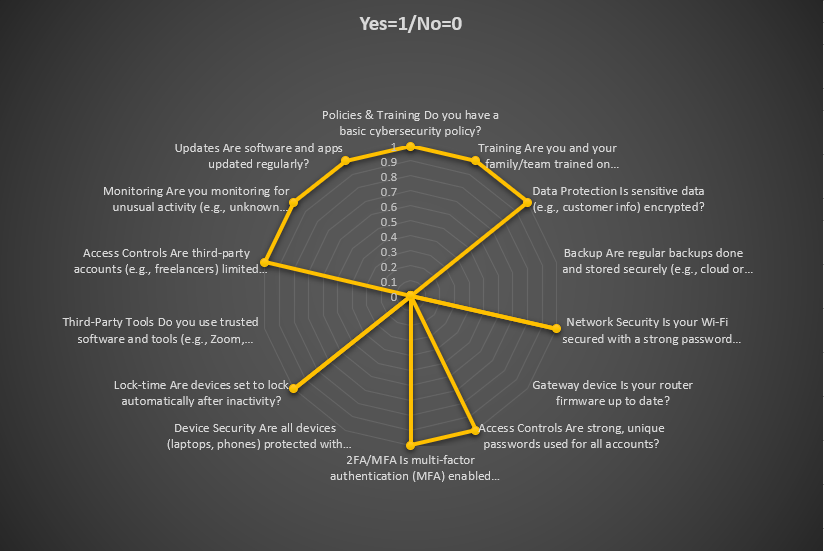
Cybersecurity Audit Checklist for Small Businesses

Use this checklist to assess your cybersecurity posture:
1. Policies & Procedures
- Do you have a written cybersecurity policy?
- Are employees trained on cybersecurity best practices?
- Is there a clear incident response plan in place?
2. Data Protection
- Is sensitive data encrypted both in transit and at rest?
- Are regular backups performed and stored securely?
- Is data access restricted based on employee roles?
3. Network Security
- Is your Wi-Fi network secured with strong encryption (e.g., WPA3)?
- Are firewalls and intrusion detection systems in place?
- Are software and firmware updated regularly?
4. Access Controls
- Are strong passwords and multi-factor authentication (MFA) enforced?
- Are user accounts reviewed and updated regularly?
- Are administrative privileges limited to authorized personnel?
5. Endpoint Security
- Are all devices (e.g., laptops, smartphones) protected with antivirus software?
- Are devices configured to lock automatically after inactivity?
- Are USB and external device usage restricted?
- Is hardening is applied on all devices and network infrastructure?
- Is blocking/closing unnecessary ports for a device on the network?
6. Third-Party Risks
- Do you vet third-party vendors for cybersecurity practices?
- Are contracts with vendors reviewed for security requirements?
- Is third-party access to your systems monitored and limited?
7. Monitoring & Testing
- Are logs monitored for suspicious activity, using SIEM tools like MS Sentinel, SPLUNK or Crowdstrike SIEM?
- Are vulnerability scans and penetration tests conducted regularly?
- Are phishing simulations performed to test employee awareness?
8. Compliance
- Are you compliant with industry regulations (e.g., Essential8/GRC,GDPR, HIPAA)?
- Are audits conducted to ensure ongoing compliance?
- Are records maintained to demonstrate compliance?
Next Steps After the Audit
- Address Vulnerabilities: Implement fixes for identified weaknesses, such as updating software or strengthening access controls.
- Train Employees: Provide ongoing cybersecurity training to keep employees informed about threats and best practices.
- Monitor Continuously: Use tools and processes to monitor your systems for new threats and vulnerabilities.
- Schedule Regular Audits: Perform cybersecurity audits at least annually or whenever significant changes occur in your business.

Final Thoughts
A cybersecurity audit is not a one-time task but an ongoing process to protect your small business from evolving threats. By following this guide and using the checklist, you can identify risks, strengthen your defences, and build a culture of security within your organization. In general Level-1 Essential 8 framework, needs should be met.
Remember, cybersecurity is an investment in your business’s future. Don’t wait for a breach to take action—start your audit today!

 SecCyberNet
Leave a comment